This article is for product listings with the Changes required or Rejected status in the Mirakl Catalog Manager. It lists every rejection reason, exactly as displayed in English in Mirakl, and the action to take for each one.
Where do I read the rejection reason in Mirakl?
In Mirakl, open Catalog → Catalog management. The To review view groups the listings with the Changes required status; to find Rejected listings, use Filter → Status → Acceptance status → Rejected.
Then click the listing’s status: a panel opens on the right, with Acceptance status details and the Reason. You can also open the listing with the eye icon next to the product name: the reason is repeated in an orange banner.
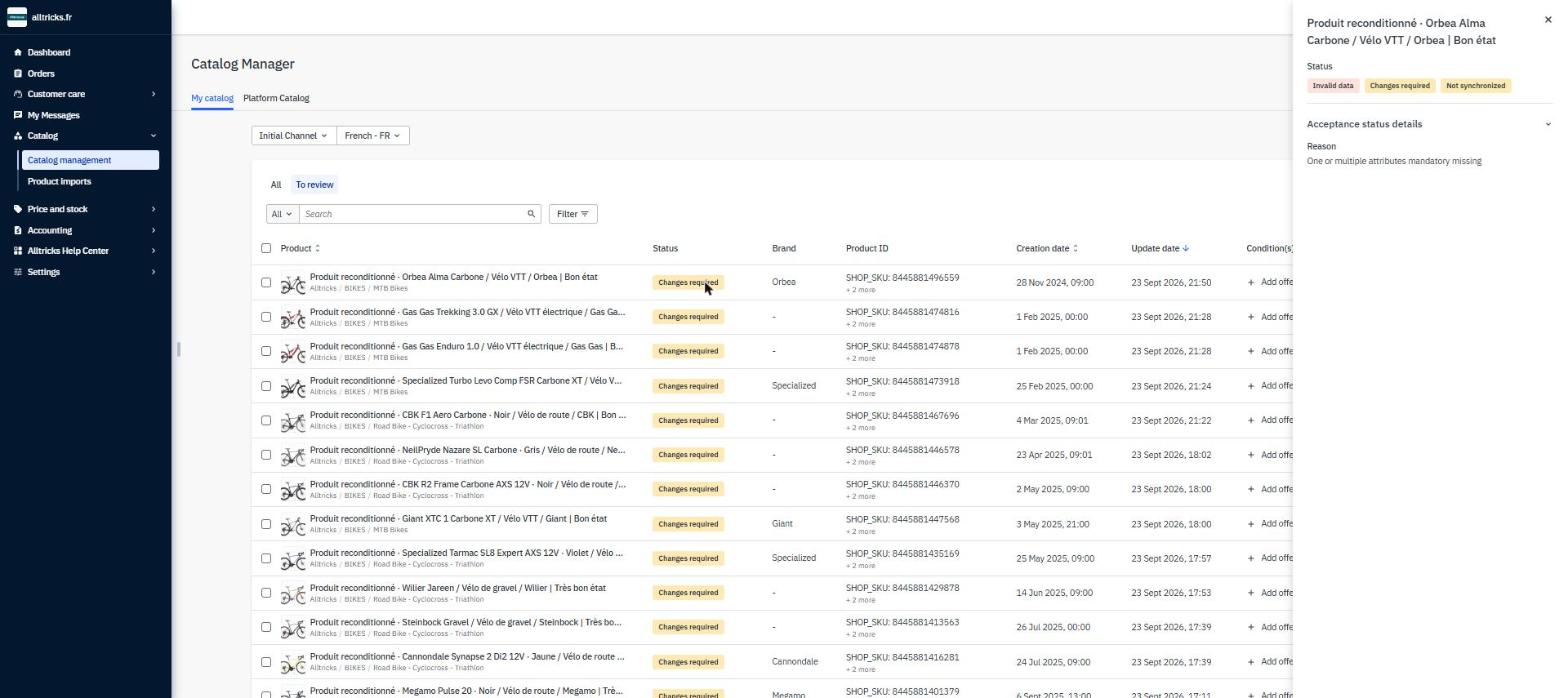
“To review” view: click a listing’s status and the right-hand panel shows its three statuses and the reason.
What are the permanent rejection reasons?
| Message displayed in Mirakl | What you need to do |
|---|---|
| The product does not comply with the terms of use of Alltricks | The product does not fit the Alltricks universe (DNA: bike, running, outdoor, trail). Frequent cases: lifestyle product, military product, scooters, pilates, ski. |
| This brand is not or no longer accepted on Alltricks | The brand does not or no longer fits the Alltricks universe. Some brands are blocked on the marketplace only for exclusivity reasons (distribution network regulation). You can request the list of the brands concerned by opening a ticket with support from your dedicated account. |
| This category is not or no longer accepted on Alltricks | The category does not or no longer fits the Alltricks universe. Examples: streetwear shoes, lifestyle watches. |
| Prohibided for sale - Potential counterfeit | This product is potentially counterfeit and its sale is prohibited. |
| Specific case | The reason for the rejection is given in a comment by our catalog team. |
| Product of old collection not accepted on Alltricks | This product comes from a collection that is too old to appear on the website. |
What are the temporary rejection reasons?
| Message displayed in Mirakl | What you need to do |
|---|---|
| Brand is missing or incorrect | The brand is missing, or it is not appropriate. If the brand does not exist in the list offered, open a ticket with support from your dedicated account so that our teams create it. |
| The EAN is missing | The EAN is missing. Make sure you pushed it in the right format (13 digits). |
| The image is missing | The image is missing. If you are sure you are pushing an image, make sure it is in the right format. |
| The background of the image has to be white | The product must at least have its main image on a white background, focused on the product. Examples are given in the "What does a compliant main image look like?" section of this article. |
| The quality of one of the images is inadequate | The main image does not meet the quality criteria: sharpness, centering, zoom, angle. In short, anything that prevents the details of the product from being properly recognized. |
| Category incorrectly entered | The category chosen for the product is not the right one. If you think you entered the right category, follow the check described in the "What if the category looks right to me?" section of this article. |
| The title has to be modified | Titles made up only of capital letters, or containing too many of them, are prohibited. Your title may also be too short or too long: it needs to be richer or simpler. It may also contain prohibited words (example: moto). |
| The Variant Group Code (VGC) is missing | The grouping attribute used to group products by size in the broad sense is missing. It is mandatory on helmets, adult bikes and textile, even if there is only one size variation. If you are unsure how to use it, push your product feed without the Variant Group Code (VGC), then add it manually as explained in the article How do I use the Variant Group Code (VGC) to group my sizes? |
| Variant Group Code Error | Error on the "grouping variable" attribute, used to group products by variant. It is mandatory for some product types, even if they have only one size variation. If you do not know how to use it, first push your product feed without this attribute, then add it manually by following the article How do I use the Variant Group Code (VGC) to group my sizes? |
| Description of your product has to be modified | Your description is too short or contains prohibited words (example: moto). |
| Follow the instructions of the pinned comment | Our catalog team indicates the specific changes to make in the comment attached to the reason. This reason may also refer to a ticket handled with you directly. |
| Legal reason - Please check the comment or ask the support | Your product listing contains one or more elements that do not comply with a legal aspect. Example of a protected name: the word "Guidoline" may only be used on products of the VELOX brand. For other brands, the appropriate term is "Ruban de Cintre" (handlebar tape). |
| One or multiple attributes mandatory are missing | One or more mandatory attributes are missing. This is frequently SP2 (the sport family of the product), SP4 (the sub-category), or an attribute specific to the category of the product pushed. |
| One or multiple attributes are incorrect | One or more attributes are faulty and need to be changed. If the catalog team accepted them, the product could be miscategorized or give wrong information to the customer. If you cannot find the value you need, send a request to support by opening a ticket. |
| "SP2" incorrect | SP2, which corresponds to the sport universe of the product, is missing. Example: blue running shoes >>> SP2_Sport = Running. |
| "SP4" incorrect | SP4, which corresponds to the sub-category of the product, is missing. Example: product = green elliptical bike with 12 preset modes, category = Vélos appartement - elliptiques - rameurs, SP4_Appareil Fitness = Vélo Elliptique. SP4 is specific to each category: if you cannot find the value you want, try changing the category of your product. |
| Waiting for the setting up of the category | We are waiting for the category to be set up before we can accept the products. |
What does a compliant main image look like?
The main image must be on a white background, focused on the product. Here are three examples:


What if the category looks right to me?
The Category incorrectly entered rejection may also come from a configuration issue. Go to your Mirakl area to check whether you are receiving the message shown in the following screenshot.

If that is the case, send the list of the EAN codes concerned by opening a ticket with support from your dedicated account, explaining your issue.
How do I handle an error made during the first import?
Handling your first product import properly is critical. If a mistake is made during that first import, Mirakl keeps this first version and does not take into account the later updates you may make.
⚠️ Important
If you mistakenly grouped two products of the same color within the same Variant Group Code (VGC), this action is irreversible.
If you made a mistake during the import, contact support and provide the list of the EAN codes of the products concerned (see the dedicated area in the form). We can then delete these products, which will let you submit your feed again correctly.
In short
- The rejection reason is read by clicking the listing’s status in Catalog → Catalog management (To review view for the listings to fix).
- A permanent rejection cannot be fixed: the product does not fit the Alltricks universe.
- A temporary rejection is fixed in your product listing, which then goes back into validation.
- Rejection messages are displayed in English in Mirakl: identify the exact message before acting.
- A Variant Group Code (VGC) mistake made during the first import is irreversible: support has to delete the products.
Learn more
- How do I know if my product is published?
- What do my product synchronization errors mean?
- How do I use the Variant Group Code (VGC) to group my sizes?
- Which words and brands are prohibited on the Alltricks marketplace?
Need help?
Open a ticket from the Marketplace support form. One request = one ticket.
Cet article a-t-il été utile ?
C'est super !
Merci pour votre commentaire
Désolé ! Nous n'avons pas pu vous être utile
Merci pour votre commentaire
Commentaires envoyés
Nous apprécions vos efforts et nous allons corriger l'article