A well-structured description gives the customer the information they are looking for straight away and makes the product listing more convincing. This article covers the expected length, the size guide, the HTML format, the value of video and the description templates available to you.
Understanding the value of a complete description
Writing a good description in HTML format for your product listings is an essential investment to increase the conversion rate. A well-structured description, with clear paragraphs, bullet lists and headings, catches the customer's attention.
Studies show that product listings with an attractive description can increase conversions by +30%. By highlighting the benefits, the key features and the possible uses, you make your offer credible and make the purchase decision easier.
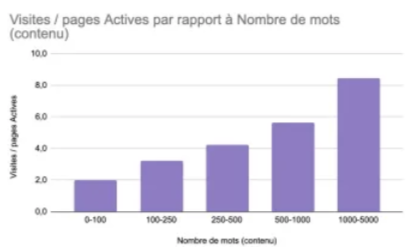
Writing a description of at least 150 words
You are advised to put a minimum of 150 words in the description. Writing at least 150 words, wherever possible, increases your product's chances of being clearly visible on the site.
Adding a size guide
Unlike buying in store, where the product can be tried on, buying online can be a barrier when the customer has a doubt about the size. A size guide can therefore be essential.
Two examples can be downloaded from the attachments of this article: Exemple de guide des tailles - Vélos (bike size guide example) and Exemple de guide des tailles - Textiles (apparel size guide example).
Using the HTML format
Using the HTML format for your product listing keeps a readable layout (bold, underline, bullets, table) and aligns the description with the rest of the site.
Adding a video inside the description
Adding a video, through a YouTube link inserted in the HTML, showcases the product and makes it feel more alive for the customer. A video explaining the assembly can also reduce after-sales service requests.
The procedure is detailed in How do I add a video to a product listing?
Downloading the HTML description templates
Four HTML description templates can be downloaded from the attachments of this article:
- Modèle vélo simple exemple (standard bike example)
- Modèle vélo simple électrique exemple (standard e-bike example)
- Modèle vélo avec géométrie exemple (bike with geometry example)
- Modèle vélo électronique avec géométrie exemple (e-bike with geometry example)
In short
- Write at least 150 words per description.
- Structure the description in HTML: headings, paragraphs, bullet lists, tables.
- Add a size guide as soon as the product is chosen by size.
- Embed a video through the HTML to present the product or its assembly.
- Start from the description templates attached to this article.
Learn more
- [RECAP] How do I boost my sales on the marketplace?
- How do I optimize my product titles?
- How do I improve my product photos?
Need help?
Open a ticket from the Marketplace support form. One request = one ticket.
Cet article a-t-il été utile ?
C'est super !
Merci pour votre commentaire
Désolé ! Nous n'avons pas pu vous être utile
Merci pour votre commentaire
Commentaires envoyés
Nous apprécions vos efforts et nous allons corriger l'article