I. You want to update your prices because you have discounted prices on certain products
This step is ONLY valid for NEW products
You have 3 types of price-related information on your offer:
the MSRP, Manufacturer's Suggested Retail Price (in € incl. tax) = PPC
the Unit price = Prix unitaire
the Discounted unit price = Prix unitaire remisé --> to be updated if you are running promotions!
You can also anticipate these discounts and include the Start/End dates of promotions in your offer file. You will have access to all of this information for verification on your Mirakl offer.
Columns to fill in to set up (in your offer file) your promotion for a given period:
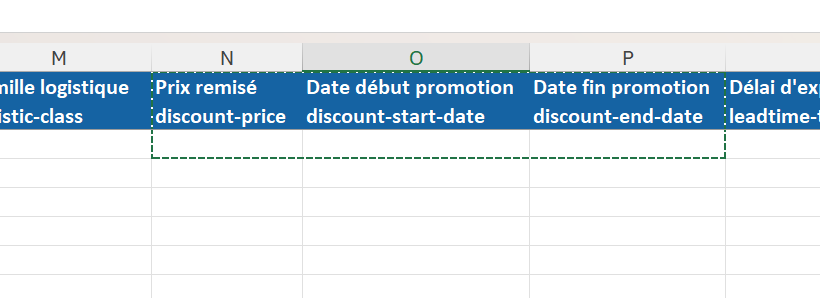
View on Mirakl of a promotion set up in advance:

II. You want to include your products in an official sales campaign communicated by the Marketplace
Follow the steps explained in the first paragraph of this document
+
To display your product at a discounted price during sales periods or commercial operations (Black Friday), you must add the promotion type with the "Promotion" value manually, via Excel or automatic offer import.
ONLY THE “Promotion” TAG will be taken into account!!!
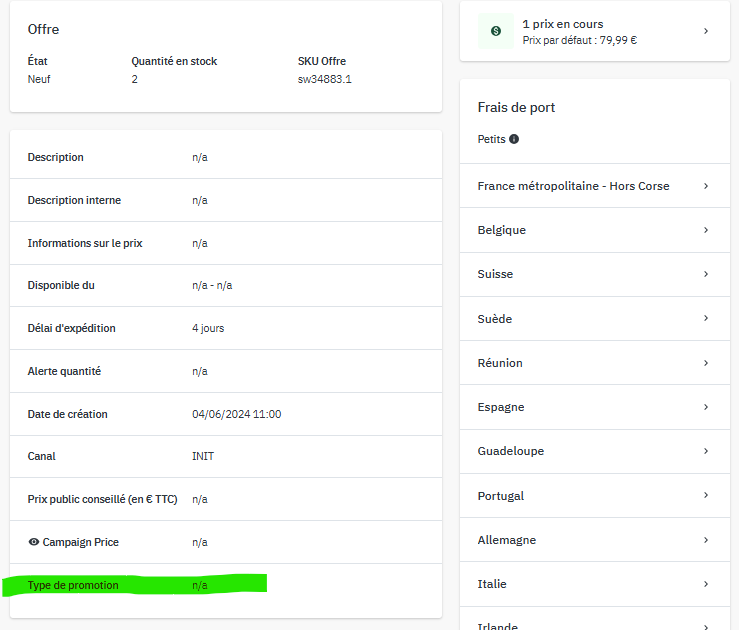
You can go to prices and stock > offers > select the offer of your choice > at the bottom of the page you will find the promotion type as shown in this image:

PLEASE NOTE: You are responsible for your prices and therefore, in the event of an inspection, you must prove that your offer complies with current legislation.
For more details concerning French legislations concerning sales, visit https://www.economie.gouv.fr/entreprises/commercants-reglementation-soldes
PLEASE NOTE: You are responsible for your prices and therefore in the event of an inspection you must pr
Cet article a-t-il été utile ?
C'est super !
Merci pour votre commentaire
Désolé ! Nous n'avons pas pu vous être utile
Merci pour votre commentaire
Commentaires envoyés
Nous apprécions vos efforts et nous allons corriger l'article