Your shipping zones, shipping methods and shipping fees are set up under Settings > Shipping > Shipping charges in your Mirakl back office. This article explains how to enable missing shipping methods, fill in your pricing grid per logistic class, and offer free shipping above a purchase threshold.
Before you start
- Access to your Mirakl back office with rights on the shipping settings
- The prices and free shipping thresholds you want to apply per country
Enabling shipping methods in Mirakl
Go to Settings > Shipping > Shipping charges, then click the country concerned.
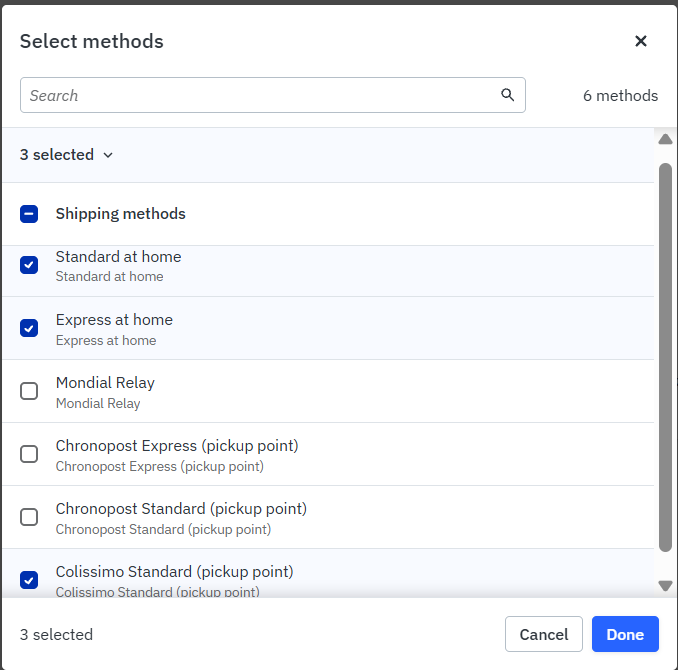
Click More actions at the top right, then Edit methods and Selected methods only: you can then select the missing shipping methods and enable them.

Then click Edit.

Select the missing shipping methods.
Offering free shipping above a purchase amount
Click each available shipping option: you can set free shipping there, based on a minimum purchase amount.

Adding a pick-up point network to a Mirakl zone
Pick-up point delivery (for example Mondial Relay) is a shipping method like any other: you activate it zone by zone from Settings > Shipping > Shipping charges. Methods activated on a parent zone are inherited by the logistic classes and methods below it.
- In the Zones block, select the shipping zone to edit (for example France > Mainland France - excluding Corsica). The Details block on the right updates to that zone.
- In the Details block, click More actions, at the top right.
- In the drop-down menu, click Edit modes.
- On the Edit zone page, in the Modes box, click Edit. If the Selected modes only option is active, only the ticked methods are offered on that zone.
- In the Select modes window, tick the pick-up network you need, in addition to the methods already ticked, then confirm with Done.
- Go back to the Shipping charges tab and click Apply to save the zone configuration.
⚠️ Important
This is an addition, not a replacement: do not untick the methods already in place, such as standard home delivery. An unticked method is no longer offered to customers on that zone.
Once the method is added, fill in shipping fees for it on that zone. A method activated without configured fees can turn your offers to the Inactive status, with the Incomplete configuration reason.
? Good to know
The configuration is specific to each zone: to offer pick-up points in France, Belgium and Spain, repeat the operation on each of those zones. If the pick-up network you expect does not appear in the Select modes window, it is not activated at operator level: open a ticket, the activation is done on our side.
Choosing the zone and filling in the Mirakl logistic classes
- Select your shipping zone from the drop-down menu (mainland France, etc.).
- Set the fees for the Small and Large logistic classes based on your product types.
- Fill in the Custom classes (1 to 5) if you have oversized items or items needing specific pricing.
- Define your shipping methods, meaning your carriers (Standard, Express, Mondial Relay).
- Enter your shipping fees per price bracket, or check the Free shipping box if you offer free delivery.
- Save for each shipping zone you configure.
? Good to know
The "Medium" logistic class isn't used at Alltricks: don't configure it.
⚠️ Important
Make sure to disable any shipping methods and logistic classes you don't use, and set your shipping fees at the logistic class level, to avoid pricing errors at checkout.
In short
- Enable shipping methods country by country from More actions > Edit methods.
- Set free shipping on each shipping option.
- Fill in the Small and Large logistic classes only.
- Set an initial price and an additional price per logistic class.
Learn more
- How do I set up my delivery times?
- What are the shipping price and delivery time rules in France and internationally?
- [RECAP] How does the order lifecycle work?
Need help?
Open a ticket from the Marketplace support form. One request = one ticket.
Cet article a-t-il été utile ?
C'est super !
Merci pour votre commentaire
Désolé ! Nous n'avons pas pu vous être utile
Merci pour votre commentaire
Commentaires envoyés
Nous apprécions vos efforts et nous allons corriger l'article