Appearing with a discounted price during sales or a commercial operation relies on two separate settings of your Mirakl offer: the discounted unit price and the promotion type. This article covers how to update your discounted prices, how to include your products in an official commercial operation announced by the marketplace, and what you remain responsible for.
Updating my discounted prices in Mirakl
Your Mirakl offer carries 3 types of price information:
- The recommended retail price (PPC), in € incl. VAT.
- The unit price.
- The discounted unit price, to be updated whenever you run promotions.
⚠️ Important
This step applies to new products only.
You can also plan these discounts ahead and enter the promotion start and end dates in your offer file. All of this information is available on your offer in Mirakl so you can check it.
Columns to fill in the offer file to set up your promotion over a given period:
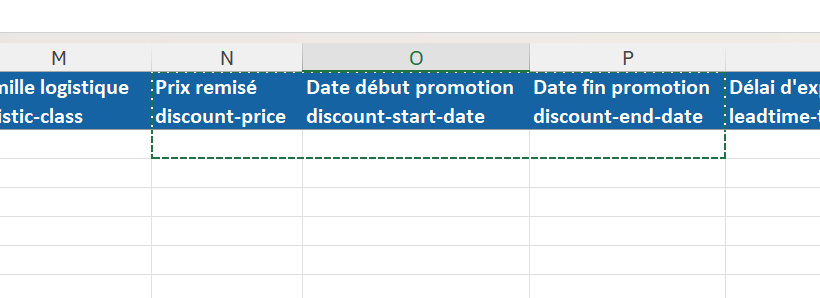
View in Mirakl of a promotion set up in advance:

Including my products in an official commercial operation
An official commercial operation is announced by the Alltricks marketplace. To take part, first update your discounted prices as described above, then add the promotion type to your offer.
To make your product appear with a discounted price during sale periods or commercial operations (Black Friday), you must add the promotion type with the value Promotion, manually, through the Excel file or through the automatic offer import.
⚠️ Important
Only the Promotion tag is taken into account. No other promotion type triggers the discounted display during sales or commercial operations.
To check this setting in Mirakl, go to prices and stock > offers > select the offer of your choice. At the bottom of the page, you will find the promotion type:

Meeting my obligations on sale prices
⚠️ Important
You are responsible for your prices, and in the event of an inspection you must prove that your offer complies with the legislation in force.
More details on the French sales regulations published by economie.gouv.fr.
In short
- Update the discounted unit price of your offer: this is the field that carries the promotion.
- Plan your discounts ahead by filling in the promotion start and end dates in the offer file.
- Add the promotion type with the value Promotion, manually, through the Excel file or through the automatic offer import.
- Check the promotion type in prices and stock > offers, at the bottom of the offer page.
- This procedure applies to new products only, and you remain responsible for your prices.
Learn more
- How do I set up my prices and my strike-through prices?
- How do I fill in and import my offer file?
- How do I check my offers?
Need help?
Open a ticket from the Marketplace support form. One request = one ticket.
Cet article a-t-il été utile ?
C'est super !
Merci pour votre commentaire
Désolé ! Nous n'avons pas pu vous être utile
Merci pour votre commentaire
Commentaires envoyés
Nous apprécions vos efforts et nous allons corriger l'article