Are there any quick wins to speed up my transition?
Please find attached a file to help you map the old categories to their new equivalents.
How do I make the transition using the method I use?
There are three ways to change the tree structure of a product sheet.
1) Manually:
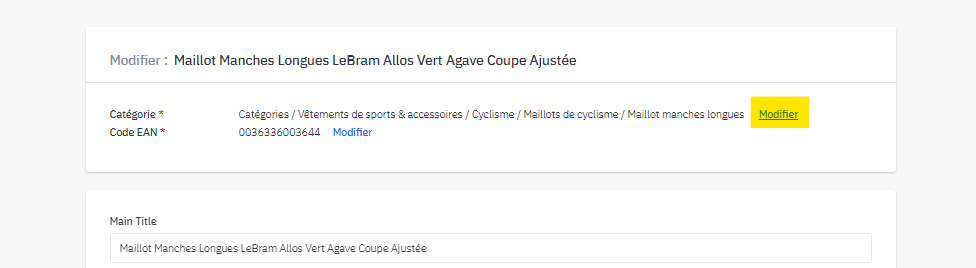
On each product sheet, you will find the option to make manual changes on the page dedicated to editing the sheet.
By importing a file:
You can use the shortcut Ctrl + F to search for and replace terms from the old tree structure with those from the new one.

Please note that this method may have its limitations, so ideally, download a file template with the new tree structure to have all the attributes and attribute values available, but also to know which attributes are now mandatory!
2) By aggregator:
To access the new tree structure, please contact your connector's support team to update your mapping.
I see a different category on the master file even though I changed the category on my end. Why is this?
Some master files are potentially fed by several source files, including yours. Mirakl applies a chronological hierarchy to source files, meaning that the oldest source file created retains priority over the master file category.
If you notice a difference even after making a change, it is important that you contact support by creating a ticket. For clarity, please mention the references (EAN) of the products concerned and title your email/ticket subject line: “New tree structure: differences between source sheet and master sheet.”
Cet article a-t-il été utile ?
C'est super !
Merci pour votre commentaire
Désolé ! Nous n'avons pas pu vous être utile
Merci pour votre commentaire
Commentaires envoyés
Nous apprécions vos efforts et nous allons corriger l'article