What is it used for? Adding a variant displays the drop-down menu on the online site, giving customers greater visibility of the size(s) available for the same item.
For example, see below:
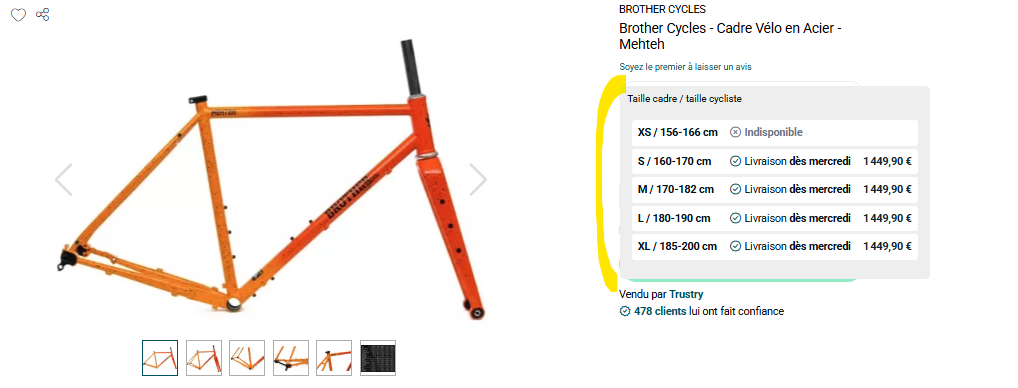
How to add it?
- IF you are creating a product listing, you can decide to activate one when you create the listing (as shown in the explanatory video below).
- IF you are using a feed aggregator, you can also add it to your product listings via the aggregator (it's best to do this from the outset!).
⚠️ Please note that once the variant has been created, it is very difficult to resynchronize everything and obtain valid DATA in the event of an error. It is therefore important to read this document carefully beforehand!
How to create it?
- The variant is MANDATORY for the following categories:
This allows you to anticipate the creation of additional sizes in the future, even if you only have one size available at present.
PLEASE NOTE: for each product category, you will have a mandatory attribute to fill in (often the size, for example, for textiles), which allows you to create the differentiating factor for your product variant!
Example:
- Textile: mandatory attribute Taille
- Bike frame: mandatory attribute Taille Cadre
- MTB wheels: mandatory attribute Corps Roues Libre
- Cassettes: mandatory attribute Denture Cassette
--> Will your jersey include a variant (drop-down menu) that displays these four different sizes online?
Before opening a support ticket, be sure to check how your variant is displayed on Mirakl! (You don't always get a complete view via the aggregator.)
The videos below will help you better understand the purpose, operation, and implementation of the Variant Group Code for products that require it. Please note that not all categories require a VGC!
Please find below the categories affected by this operation.
How to group your product by colour?
https://www.alltricks.fr/F-41489-gants/P-3126511-gants_longs_fox_flexair_corail
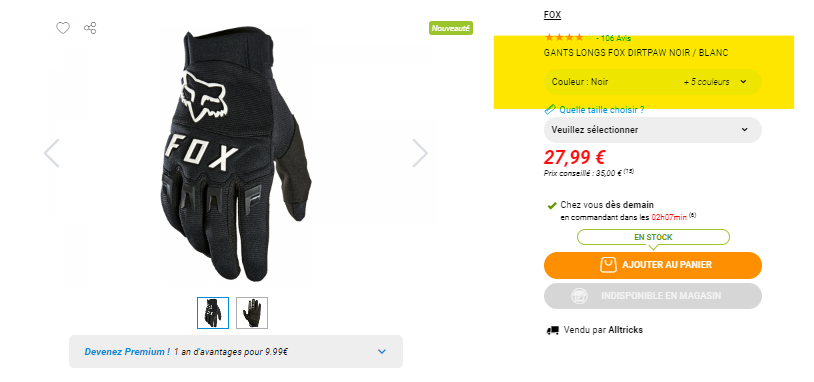
It's very simple!
Fill in the following attributes and the site will take care of the rest:
- The model
- The main color
- The gender
Exemple :
| Produits | Taille | Modèle | Couleur | Genre |
| Gants Longs Dirtpaw Noir | S | Gants Longs Dirtpaw | Noir | Homme |
| Gants Longs Dirtpaw Noir | M | Gants Longs Dirtpaw | Noir | Homme |
| Gants Longs Dirtpaw Rouge | S | Gants Longs Dirtpaw | Rouge | Homme |
...............
Explanations:
Cet article a-t-il été utile ?
C'est super !
Merci pour votre commentaire
Désolé ! Nous n'avons pas pu vous être utile
Merci pour votre commentaire
Commentaires envoyés
Nous apprécions vos efforts et nous allons corriger l'article